Sentidant One
Die Anleitung in deiner Sprache
Die vollständige Bedienungsanleitung auf Deutsch gibt es als PDF. Die Anleitung unten ist auf Englisch.
Highlights
- Emotion suggestions: on-watch sensors suggest which of 12 emotional states you may be in. You confirm or correct, and the watch learns you.
- Emotion sharing: send an emotion to the people you choose. They feel it on their wrist as a pattern, a sound and a colour.
- Live heartbeat sharing: feel your person’s pulse on your wrist in real time. Both of you need a Sentidant watch.
- Wellbeing: heart rate, heart-rate variability (HRV) and sleep, plus an on-demand blood-oxygen check.
- Workouts: 9 activity modes, with GPS route tracking for outdoor activities.
- Watch faces: including Follow Emotion and a face made from your own photo.
- Calls and texts: standalone 4G calls and text messages with a nano-SIM. No phone needed.
- Wi-Fi, Bluetooth and GPS, and the companion Sentidant app for iPhone and Android.
In the box
- Sentidant One watch
- Magnetic charging cable
- Silicone strap
- Quick-start cards, with the QR code to download the Sentidant app
- Instruction manual
Specifications
- Product
- Sentidant One (model IDA01)
- Display
- 1.97″ AMOLED touchscreen
- Connectivity
- 4G LTE (nano-SIM), Wi-Fi 2.4 GHz, Bluetooth, GPS
- Sensors
- Optical heart rate (PPG), blood oxygen, accelerometer, barometer, ambient noise
- Water resistance
- IP68
- Battery
- 500 mAh (rated)
- Charging time
- About 2 hours
- Materials
- Middle frame and bottom case: plastic. Decorative parts and buttons: aluminium alloy. Strap: silicone
Getting to know your watch
Side button (crown) · magnetic charging contacts · speaker · nano-SIM card slot · optical heart-rate sensor · microphone.
Buttons and gestures
- Wake the screen
- Press the side button
- Go to the watch face
- Press the side button. During a live workout or heartbeat, this takes you back to it
- Go back one step
- Swipe in from the left edge of the screen
- See your emotions (My Emotions)
- Tap the watch face
- Share an emotion
- Press and hold the watch face
- Main menu
- Swipe up from the watch face
- Measure (workouts, heart rate, blood oxygen and more)
- Swipe down from the watch face
- Utilities (calls, messages, Wi-Fi, Bluetooth and more)
- Swipe left from the watch face
- Change the watch face
- My Sentidant → Display & Sound → Watch face, or in the app
Before first use
- Remove all packaging and protective film.
- Check the watch and cable for visible damage.
- Make sure the charging contacts are clean and dry.
- Charge the watch fully.
- Insert a nano-SIM if you want to use 4G calls, messages and mobile data (see Installing a nano-SIM).
- Download the Sentidant app (see Get the app and pair your watch).
- Turn on the watch and follow the steps on screen to pair it with your phone.
Charging
- Make sure the watch and the charging contacts are completely dry.
- Place the magnetic end of the cable on the contacts on the back of the watch. The magnets align it.
- Connect the cable to a USB power source.
- Check that the watch shows the Charging screen. If it doesn’t, re-seat the connector.
- A full charge takes about 2 hours from low. A weak USB port can take up to 2.5 hours.
Charging tips
- The watch can feel warm while charging. This is normal.
- Don’t charge it while wet, under a pillow, in direct sun, or in very hot, cold or humid places.
- Don’t force the connector into position or cover the watch while it charges.
- Disconnect the charger if the watch or cable becomes unusually hot.
Turning the watch on and off
- To turn on: press and hold the side button until the start-up animation appears. If the watch asks, tap Start.
- To turn off or restart: with the watch on, press and hold the side button, then follow the options on screen.
- If the watch won’t turn on, charge it for a few minutes and try again.
- Don’t choose a factory-reset option unless you mean to erase the watch.
Installing a nano-SIM
Switch the watch off first.
- Open the SIM card cover.
- Insert a standard nano-SIM in the direction shown by the slot guide.
- Make sure it is seated correctly, then close the cover completely.
- Turn the watch on.
The SIM gives your watch its own mobile connection, so calls, texts and sharing work away from Wi-Fi. Use a SIM with an active plan that includes mobile data. For calls and texts, the plan must include them too.
Get the app and pair your watch
- Scan the QR code on the quick-start card with your phone’s camera and install the Sentidant app.
- Open the app, create your account and tap Let’s begin.
- Turn on your watch. It shows Scan to connect with a code. If it asks, tap Start first.
- Your watch needs the internet before it can pair. If it shows Getting a pairing code… or Can’t reach Sentidant, swipe back from the pairing screen, open Wi-Fi → Choose a network and join a 2.4 GHz network, or insert a nano-SIM with mobile data.
- In the app, tap Start pairing and scan the code on your watch. You can also tap Type the code instead and enter the code shown on the watch.
- Keep the app open near your watch until it says Linked.
Both the watch and the phone need an internet connection: Wi-Fi (2.4 GHz) or mobile data. Bluetooth must be on. The code on the watch refreshes by itself if it expires.
To pair later: in the app, go to Profile → My Sentidant → Sentidant Watch → Link with Watch.
Add your people
The people you share with are your friends in the app.
- In the app, tap the People icon, then Add a friend.
- Search for someone and tap Invite, or tap Invite friends to send them a link.
- When they accept, they appear on your watch’s Share with list.
A friend request you receive appears in the app under People → Requests. Tap Accept.
How Sentidant understands emotion
Your watch reads your heart rate, the rhythm between your heartbeats (HRV) and your movement. From these it suggests which of 12 emotional states you may be in, measured against your own normal, not anyone else’s.
It asks. You answer. It learns you. Every time you confirm or correct a suggestion, the watch learns a little more about how your body shows what you feel. The first days are when it learns the most.
When the signals are unclear, the watch shows Listening… or asks you instead of guessing. You are always the judge of how you feel.
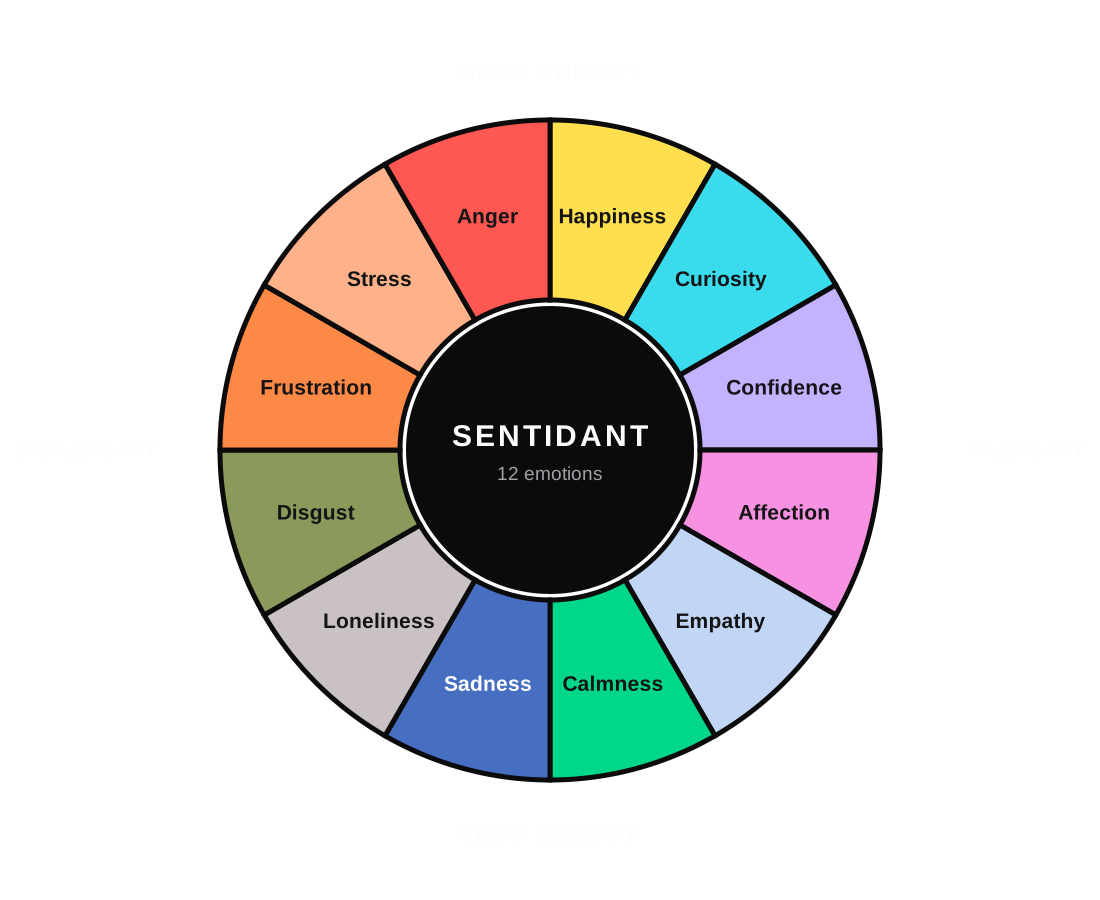
The 12 emotions sit on two scales: how pleasant a feeling is, and how much energy it carries.
Check-ins: teaching your watch
About every 30 minutes while you wear it, your watch asks: Want to name it?
- Tap Yes. The watch shows its suggestion and asks Close?
- If it’s right, tap Yes. If not, tap No and choose the emotion that fits better. This is how it learns.
- Then choose Keep (only you see it) or Share.
- If you ignore a check-in, it closes by itself.
The watch may also ask when it notices a change: Your Sentidant felt something shift just now.
Your settings
- How often it asks: My Sentidant → Emotions → Detect frequency (30 minutes to 4 hours).
- What happens after you name an emotion: Emotion recording: Keep / Share required, Auto-keep or Auto-share. The same settings are in the app under Profile → My Sentidant → General.
Sharing an emotion
- Press and hold the watch face, or answer a check-in.
- Choose the emotion you want to share.
- Tick the people you want to share with and tap Share.
Their watch plays that emotion’s pattern, sound and colour, and they can reply. You can also share from the app. Nothing is shared unless you choose to share it.
If your watch is on 4G only, away from Wi-Fi and your phone, a share can take up to about an hour to arrive, and a heartbeat invitation can be missed.
Live heartbeat sharing
- Swipe up from the watch face and open My Wellness.
- Tap Share my heartbeat, choose a friend and tap Share.
- When they accept, you each feel the other’s pulse on your wrist. Tap End to finish.
Both people need a Sentidant watch. The app shows your heartbeat history.
Health and activity
- Heart rate, HRV and sleep are recorded automatically while you wear the watch, and shown in the app.
- Blood oxygen is an on-demand check: swipe down → Blood oxygen → Start, and keep still for up to 20 seconds. It is a spot check.
- Workouts: swipe down → Workout and choose one of 9 activities. Outdoor activities record your GPS route.
Calls, messages and SOS
These need a nano-SIM with an active plan.
- Calls: swipe left → Call. The first time, allow Sentidant to be your phone app.
- Messages: swipe left → Message → SMS. The first time, allow Sentidant to be your messaging app. Picture messages (MMS) are not supported.
- SOS: set your contact in My Sentidant → Emergency SOS → Emergency contact. To call them, press and hold the red button for 3 seconds. The first time, allow Sentidant to make calls.
SOS calls your saved contact, not the emergency services. To call the emergency services, dial the number (for example 112 or 911) on the keypad.
Watch faces
Go to My Sentidant → Display & Sound → Watch face, or choose one in the app. Your choice syncs between the watch and the app. Faces include Follow emotion, whose colour follows your emotions, and a Photo face made from a picture on your phone.
Language
This guide and the Sentidant app are available in English, Français, Español, Deutsch, Italiano, Português and 简体中文.
- Guide in your language: scan the QR code on the Guide in your language card, or visit sentidant-1.com/guide.
- App: Profile → My Sentidant → General → Language.
- Watch: the watch’s own screens are in English. More watch languages will follow in a software update.
Battery tips
- Charge every day, ideally at a time you’re not wearing the watch.
- The watch uses less battery on Wi-Fi or near your phone than on 4G alone.
- Lower the screen brightness and the check-in frequency to save power.
Privacy and your data
Your feelings are yours. Nothing is shared unless you choose to share it, and you decide who sees what. You can delete your account and data at any time in the app.
Full privacy notice: in the app and at sentidant-1.com/privacy.
Troubleshooting
- The watch says Can’t reach Sentidant
- Connect the watch to Wi-Fi (2.4 GHz) or insert a SIM with mobile data
- The watch won’t pair
- Check both have internet and Bluetooth is on. Wait for a fresh code on the watch, or use Type the code instead
- The app doesn’t say Linked
- Keep the app open near your watch until it does
- My friend isn’t on my watch’s list
- Check they accepted your invitation in the app. Give the watch a minute to sync
- A shared emotion arrived late
- On 4G only, away from Wi-Fi and your phone, a share can take up to about an hour. It catches up when connected
- The suggestions don’t match how I feel
- Keep answering check-ins. The watch learns from every correction
- The watch won’t charge
- Clean and dry the contacts, re-seat the cable and look for the Charging screen
- No reading during a heartbeat share
- Make sure the watch is snug on your wrist and try again
Cleaning and care
- Switch the watch off if necessary and disconnect it from the charging cable.
- Wipe the watch with a clean, soft cloth.
- Keep the charging contacts and the sensors on the back free from dirt and residue.
- Dry the watch thoroughly before charging.
- Do not use household cleaning chemicals, abrasive cleaners or sharp objects.
- Do not immerse the watch in cleaning solution.
- Keep cleaning products out of the SIM card slot, microphone and speaker.
Storage
When you won’t use the watch for a long time, store it in a cool, dry place, away from direct sunlight, extreme temperatures and moisture. Don’t place heavy objects on it, and store the cable without sharp bends.
Safety precautions
- Do not expose the watch or its accessories to extreme temperatures or fire.
- Avoid strong impacts, drops and excessive vibration.
- Do not crush, puncture, disassemble, modify or try to repair the watch yourself. If it malfunctions, contact an authorised service provider.
- Do not charge the watch while it is wet, handle the charger with wet hands, or use damaged charging equipment.
- Do not insert objects into the SIM card slot or other openings. Use only a standard nano-SIM, and make sure the SIM cover is closed properly.
- Do not wear the watch excessively tightly.
- Stop using the watch if it becomes damaged or unusually hot.
- Water resistance can weaken over time through wear, impacts or damage to the seals.
Disclaimer
- Health and wellbeing functions are for general wellness purposes only. Results can vary with your body, how the watch fits, your surroundings and your activity.
- Emotion suggestions are estimates based on body signals. They are not a diagnosis of any mental or medical condition.
- This watch is not a medical device and must not replace professional medical advice. Always consult a qualified healthcare professional about medical concerns.
- All product and company names are trademarks™ or registered® trademarks of their respective holders. Their use does not imply any affiliation with or endorsement by them.
Support
Questions or problems: info@sentidant.com or sentidant-1.com/support. To delete your account and data: sentidant-1.com/delete-account.
Regulatory, safety-certification and warranty information is in the printed leaflet in the box.